DNS Records Notes
Taking from TryHackMe’s DNS in Detail course.
DNS - Domain name system
Communicate with devices without remembering complex numbers
every computer has a unique ip address:
- 4 swets of digits ranging from 0-255 separated by a
. - Instead of remembering an Ip address, we input a DNS (e.g google.com)
Domain hierarchy
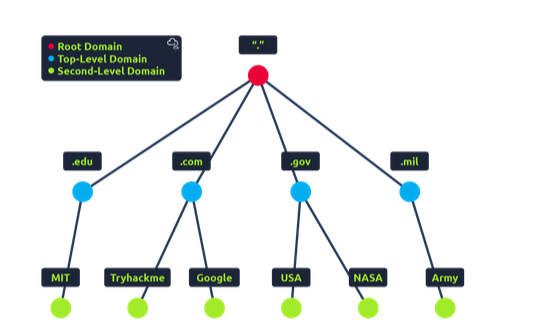
TLD - Top level domain
- most righthard part of the domain name
- e.g tryhackme.com TLD is
.com - 2 types of TLD: gTLD (generic top level) and ccTLD (country code top level domain)
- historically, gTLD was for the domain’s purpose. e.g .com is commercial, .org for organisations, etc…
- ccTLD for geographical → e.g .ca for canada, .co.uk for uk, etc..
- e.g tryhackme.com TLD is
Second level domain:
- for trahackme.com → tryhackme is thesecodn level domain
- limited to 63 characters
- TLD can only use a-z0-9 and hyphens
- can’t start/end with hyphens or consecutive hyphens
Subdomain
- for
admin.tryhackme.comtheadminis the subdomain - same restrictions as second level domain in terms of naming
- you can use multiple subdomains split with periods to create longer lengsths
- length muist be kept ot 253 characters or less
- no limit to subdomains
Record Types
A Record:
- records resolve to IPv4 addresses
- e.g 104.26.10.229
AAAA Record
- records resolve to IPv6 addresses
- e.g 2606:4700:20::681a:be5
CNAME Record
- records that resolve to a different domain name
- e.g a subdomain name for
store.tryhackme.comcould return a CNAME recordshops.shopify.comin which another DNS request to that record will be conducted to find the IP address
MX Record:
- records resolve to the address of the servers that handle the email for the domain that is being queried
- a MX record response for
tryhackme.comwould be something likealt1.aspmx.l.google.com - records also have a priority flag
- tells clients in which order to try servers
- good if the main server goes down and email needs to be sent to a backup server
TXT record:
- TXT records are free text fields where any text-based data can be stored
- TXT records have multiple uses but some common ones can be to list servers that have the authority to send an email on behalf of the domain
- can be used to verify ownership of the domain name when signed up for third party services
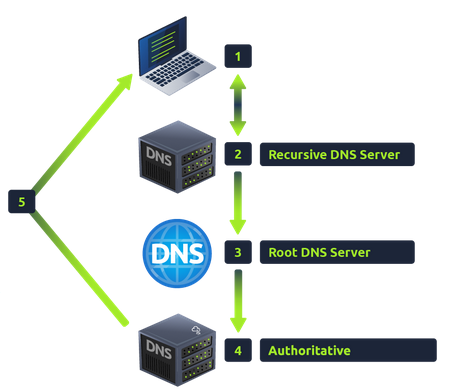
Make a request
- When you request
- first check local cache if address recently visited
- if not, reuqest to your recrusive DNS server made
- A recursive DNS server typically provided by ISP (internet server provider) but you can choose your own
- server also have recenttly used domain names
- if locally found, sent to computer
- if not found, serrch continue at internet root DNS servers
- root servers are the DNS backbone of the internet → redirect you to the correct top level domain server
- the TLD server holds records for where to find the authoritiative server to answer the DNS requests
- authoritative server also known as the nameserver for the domain
- e.g tryhackme.com could have name server
kip.ns.cloudfare.comanduma.ns.cloudfare.com - often multiple name servers as back up
- e.g tryhackme.com could have name server
- authoritative server also known as the nameserver for the domain
- authoritative DNS server is responsibile for storing the DNS records for a particular domain name and where any updateds to your domain name DNS records would be made
- depending on record type, the DNS record is sent back to the recrusive dns server where a local copy is cached
- DNS records come with a TTL (time to live) value
- value represented in seconds that the response should be cached for
- caching saves on having to make a DNS request every time you communicate with aserver
Fun terminal commabnds
nslookup shop.website.thmfinds DNS records for a domain name
You can look into specific types of records if you want