HTTP Notes
These notes were constructed using TryHackMe’s HTTP in Detail course as reference
Intro to HTTP, Request and Response
HTTP - HyperText Transfer Protocol
- set of rules used for communicating with web servers for transmitting webpage data (HTML, imgs, videos, etcc…)
HTTPS - HyperText Transfer Protocol Secure
- The secure version of HTTP
- HTTPS data is encrypted so it prevents people from seeing the data you are receiving and sending but it also gives you assurances that you’re talking to the correct web server and not something impersonating it.
Parts of a URL
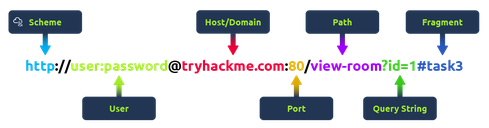
- URL - Uniform Resource Locator
- Scheme: IInstructs on what protocol to use for accessing the resource (HTTP, HTTPS, FTP - [File transfer protocol])
- User: Some services require authentication to login. Username and password can be put into the URL to login
- Host: the domain name/ip adress of the server
- Port: the port you are connecting to → usually 80 for HTTP and 443 for HTTPS but the port can be anything between 1-65535
- Path: the file name or location of the resource you are trying to access
- Query String: Extra bits of information that can be sent to the requested path
- Fragment: Reference to a location on the actual page requested. Commonly used for pages with long content and can have a certain part of the page directly linked to it, so it is viewable to the user as soon as they access the page
Making a Request
All you really need is:
- a request method
- the HTTP protocol version
- the website being requested
However you will likely want other data. Typically sent in the headers
- Headers are secure and typically used for storing authentication information User-Agent: what webserver is being used referer: which web server referred us to the requested website HTTP requested end with a blank line to inform the web server that the request has finished
GET / HTTP/1.1

Host: tryhackme.com

User-Agent: Mozilla/5.0 Firefox/87.0

Referer: https://tryhackme.com/
From a request, we will get a response The response can have information such as the:
- Version of the HTTP protocol the server is using + a status code
- web server software and version number
- Current time and timezone of web server
- content-type → tells client what type of information is being sent
- Content-length - how long the response is - confirm that data isn’t lost
- HTTP response will use a blank line to confirm the end of the HTTP response
- the information being requested
HTTP Methods
Everytime you send a HTTP Request, you also supply a HTTP Method which describes what you want the web server to do
- GET - Read records
- POST - Create records
- PUT - Update records
- DELETE - Delete records CRUD
HTTP Status Codes
Represent the response of the request. The ranges are
| Range | Category | info |
|---|---|---|
| 100 - 199 | Information Response | Sent to tell the client the first part of their request has been accepted and they should continue sending the rest of their request. No longer common |
| 200 - 299 | Success | Tells the client their request was successful |
| 300 - 399 | Redirection | Redirect the client’s request to another resoruce. Can be either to a different webpage or a different website altogether |
| 400 - 499 | Client Errors | Used to inform the client that there was an error with their request |
| 500 - 599 | Server errors | Reserved for errors happening on the server-side and used to indicate quite a major problem with the server handling the request |
Common status codes:
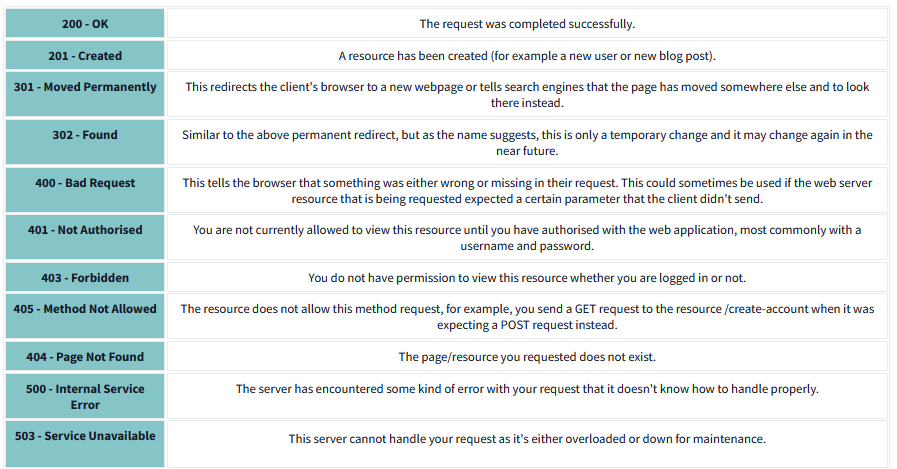
Headers
Common request headers include:
- Host - Web servers host multiple websites so you can specify which one you need
- User-Agent - Your browser software and version number so that web server can format the website properly for your browser
- Content-Length - tells the web-server how much data to expect in the web request
- Accept-Encoding - Tells webserver what compression methods to use
- Cookie - Data sent to the server to remember your information
Common response headers:
- Set-Cookie - Information to store which gets sent back to the web server on each request
- Cache-Control - How long to store the content of the response in the browser’s cache before it requests it again
- Content-Type: This tells the client what type of data is being returned. i.e HTMl, CSS, Javascript, Images, PDF, Video, etc. Using the content type header the browser then knows how to process the data
- Content-Encoding - What method has been used to compress the data
Cookies
Small piece of data stored on computer.
Every request you make, you send cookie data back and forth from and to the web server.
HTTP is stateless (doesn’t keep track of previous request). Cookies remind web servers who you are
Can be used for any purpose but commonly for website authentication